![Asset 5@3x-8.png]](https://help.snaplyphoto.com/hs-fs/hubfs/Logo/Asset%205@3x-8.png?height=40&name=Asset%205@3x-8.png)
Rescheduling an appointment
You can easily reschedule an appointment by logging into your account on www.SnaplyPhoto.com.
Click on 'Orders' on the left and select the order that you would like to reschedule. Scroll down until you see your appointment and select 'reschedule'.
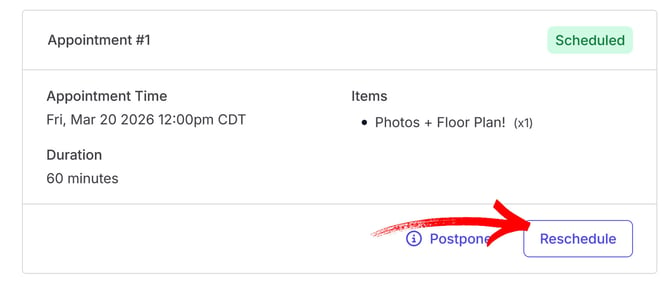 A calendar opens up where you can see all available time and date options. Select the time and date that works best for you, and click 'reschedule' on the confirmation window.
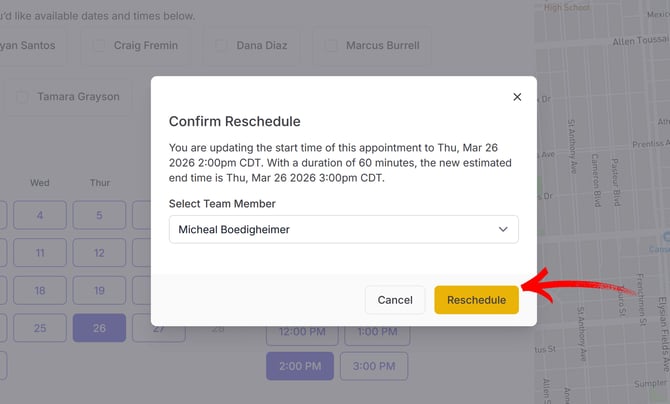
You will receive an email confirming your new appointment date and time.
Canceling an appointment
If you need to cancel your appointment and do not plan to reschedule at a later date, you can easily do so through your account at www.SnaplyPhoto.com. We’ve made the process simple and convenient.
Once logged in, click on 'Orders' on the left and select the order that you would like to cancel. Click on 'cancel order' and select 'yes, cancel order' to confirm.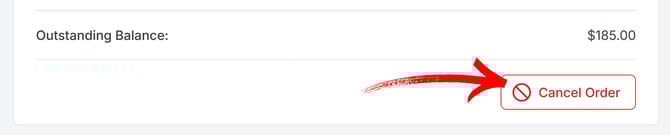
You will receive an email confirming the cancellation of your order. If a payment has been made, our team will issue a refund which should show up in your bank account within a couple of business days.
Postponing an appointment
Do you want to cancel an appointment for the time being, but reschedule at a later date? No problem! You can postpone an appointment from your account on www.SnaplyPhoto.com. Doing so will remove the appointment, but will keep the order active so that you can schedule a new appointment when you are ready.
When postponing an appointment, no refund will be issued. However, if you postpone an appointment and decide to fully cancel at a later date, we will process the refund, which should show up in your bank account within a couple of business days.
To do so, once logged in, click on 'Orders' on the left and select the order that you would like to postpone. Click on 'postpone' and select 'postpone appointment' on the confirmation window.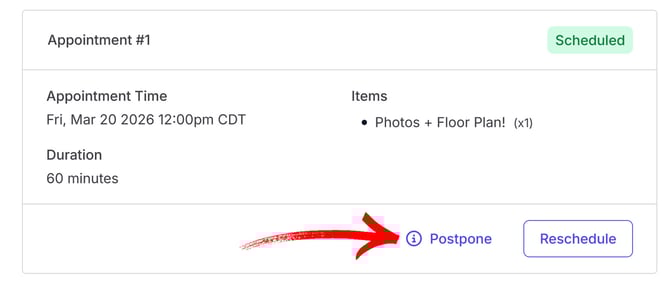
Once you are ready to reschedule, reach out to our customer support team by email: hello@snaplyphoto.com or by phone: (303) 900-0469 and we will be happy to set up a new appointment!
Late Cancellation
You can cancel, reschedule or postpone an appointment from our website up to 12 hours before the start time of the appointment. If you need cancel, reschedule or postpone within 12 hours of the appointment time, please reach out to our support team by email: hello@snaplyphoto.com or by phone: (303) 900-0469
We may charge a $65 Late Cancellation Fee for appointments cancelled, rescheduled or postponed within 12 hours of the appointment time.