![Asset 5@3x-8.png]](https://help.snaplyphoto.com/hs-fs/hubfs/Logo/Asset%205@3x-8.png?height=40&name=Asset%205@3x-8.png)
Creating an account
Step 1
To start creating an account, go to www.SnaplyPhoto.com and click on 'Login' on the top right.

Step 2
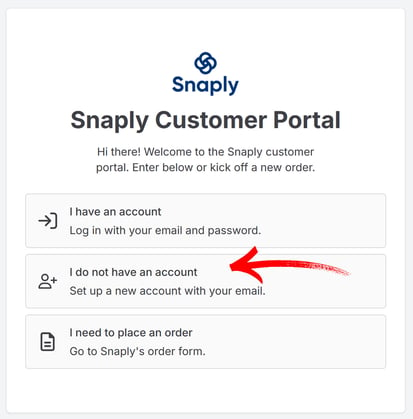
In the next window, select 'I do not have an account. Set up a new account with your email'.
Step 3
A new window will open up. Here, fill out all the required information. Select the box confirming that you are not a robot, and click on 'Create Account'
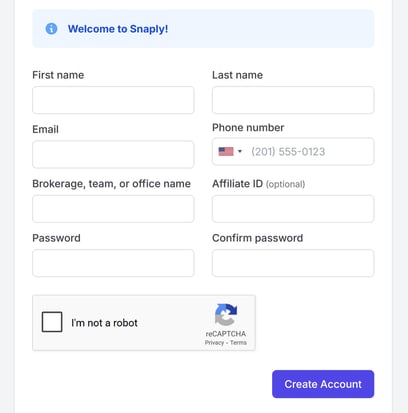
Required fields are:
- First name
- Last name
- Email
- Phone number
- Brokerage, team, or office name
- Password
- Confirm password
You may be asked to solve a simple puzzle after selecting 'I'm not a robot', after which you can select 'Create Account'
Step 4
Congratulations! Your account has now been created and you can place your first order. To do so, click on 'Place Order'